
Models & pricing
Auto modes, the models Mel offers, plans, credits, and using your own keys.
Mel's agent uses models from eleven providers: Anthropic (Claude), OpenAI (GPT), Google (Gemini and Gemma), xAI (Grok), Groq, DeepSeek, Moonshot (Kimi), Z.ai (GLM), MiniMax, Alibaba (Qwen) and Xiaomi (MiMo). Leave the model on auto and Mel picks one for each turn, or pick one yourself. The terminal is free; the agent runs on your plan's credits, or on your own provider key for 0 Mel credits.
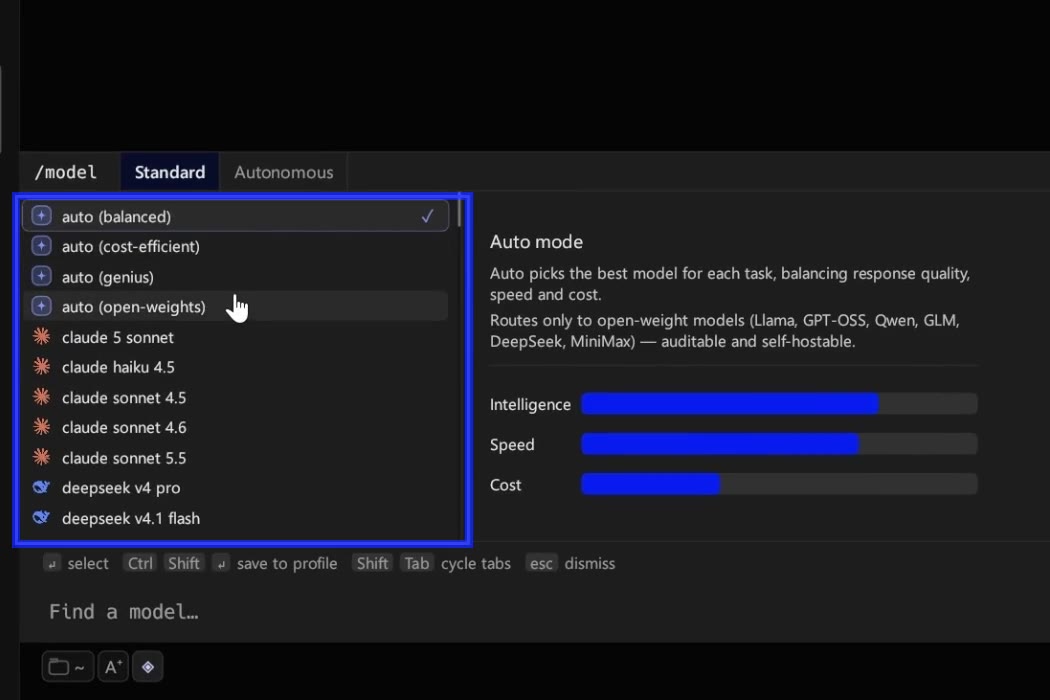
Auto and its four modes
auto is the default. It reads each turn and routes it to a model that fits, with no extra model call before your answer starts. The chip shows auto → model once a turn has routed, and the usage line under the answer says which model answered and why.
Open the model chip, or type /model, to pick a mode:
| Mode | What it does |
|---|---|
| Balanced (the default) | The quality each step needs, leaning a little toward faster models. |
| Cost-efficient | Prefers the cheapest capable model, and escalates only when it has to. |
| Genius | Escalates to the strongest model when the task is hard, and still uses fast, cheap models for simple turns. |
| Open-weights | Routes only to open-weight models, such as GPT-OSS, Qwen, GLM, DeepSeek and MiniMax. |
A mode sets how high auto may reach; it never pins one model for every turn. A hands-off or orchestrated run keeps the mode you picked and is routed as long, multi-step agent work. The mode you pick in the menu becomes the default for new conversations, and the chip names it — auto (genius). You can also set it in Settings ▸ AI ▸ Default models ▸ Auto mode.
Picking a model yourself
The picker lists every model with its maker's icon, and Find a model… filters it. Hover a model to see its Model Specs card: intelligence, speed and cost bars, plus its context window. Picking a model pins it for that conversation only; Ctrl+Shift+Enter on a row also saves it as your default. Pick an auto mode to go back to routing. See Models & routing for reasoning levels and what happens when a model is unavailable.
Providers
| Provider | Models | On Mel's credits | On your own key |
|---|---|---|---|
| Anthropic | Claude | ✓ | ✓ |
| OpenAI | GPT | ✓ | ✓ |
| Gemini, Gemma | ✓ | ✓ | |
| xAI | Grok | ✓ | ✓ |
| Groq | GPT-OSS and Qwen, served fast | ✓ | ✓ |
| DeepSeek | DeepSeek | ✓ | ✓ |
| Moonshot | Kimi | ✓ | ✓ |
| Z.ai | GLM | ✓ | ✓ |
| MiniMax | MiniMax | ✓ | ✓ |
| Alibaba | Qwen | ✓ | ✓ |
| Xiaomi | MiMo | ✓ | ✓ |
| NVIDIA | Nemotron | — | ✓ |
The picker in the app is the full, current list of models.
Plans and credits
1 credit = 1 cent. A turn is billed what the model that answered actually cost, cached context included, plus a 20% margin. Shell commands and CLI coding agents never use credits.
| Plan | Price | Credits each month |
|---|---|---|
| Free | $0 | none: the agent runs on your own provider key |
| Pro | $20 a month ($18 billed yearly) | 1,500 |
| Max | $200 a month ($180 billed yearly) | 18,000 |
| Business | $50 a seat a month ($45 billed yearly), 2 seats minimum | 1,500 a seat, shared by the whole team, on one invoice |
Every answer's usage line shows what it cost. Add-on packs, auto-reload and the per-plan limits are on Billing & usage; Business is on Teams & Business.
Your own provider key
Open Settings ▸ AI ▸ Provider API keys (the avatar menu's Provider keys (BYOK) goes there), paste a key into its provider's row and save. Turns on your key cost 0 Mel credits; you pay the provider directly. The key is kept in your operating system's keychain (on Linux, in a file only your user can read), sent only with your own requests, and removed when you sign out. Groq and Google AI Studio both give free keys: see Get a free model key.
Spend fewer credits
Credits follow what the model that answered cost, so most savings come from sending less and routing well:
- Bring your own key. A turn on your own provider key costs 0 Mel credits; you pay the provider directly. Groq and Google AI Studio give free keys.
- Use the Cost-efficient mode. Pick auto ▸ Cost-efficient for everyday work; it escalates only when it has to. Keep Genius for the hard problems.
- One conversation per task. Every step re-reads the conversation, so a long thread about something else costs on every turn. Start a new one when the topic changes.
- Compact long conversations.
/compact <what to keep>replaces older turns with a short summary. Mel also compacts by itself when a conversation nears the model's window. See Conversation management. - Attach what's needed. Attach the one failing block, not a whole log, and only the screenshots that matter; everything attached counts toward the context gauge.
- Write rules once. Put build and test commands in
MEL.mdso the agent doesn't search for them every time. See Rules & MEL.md. - Use the terminal for terminal work. Shell commands and CLI coding agents never use Mel credits.
Cached context helps too: providers bill a re-read of the same conversation at a fraction of the normal price, and so does Mel.
FAQ
How do I use fewer credits with an AI coding agent? Use your own provider key (0 Mel credits), pick the Cost-efficient auto mode, keep one conversation per task and compact long ones.
Does Genius always use the biggest model? No. It lets hard turns reach the strongest model, and keeps simple turns on fast ones.
Why did a different model answer than the one I expected? If a model is unavailable, Mel moves to another one and tells you which model answered.
Does my own key lift every limit? It removes the credit cost of a turn. Web search, voice input and command suggestions run on Mel's own accounts, so their daily limits still apply.
Does "hi" or "thanks" cost credits? No. A short greeting, thanks, goodbye, "who are you" or "what can you do" is answered at once with a reply written in advance, in the language you wrote it in. No model runs, so it uses no credits. Anything that looks like a task, or that Mel is not sure about, goes to a model as usual.