
Prompting
How to ask for work so the agent gets it right the first time.
To get good results from Mel's agent, say what done looks like and hand it the context it can't guess: a terminal block, a file, a pin, an image or your project's MEL.md. Name the goal, the place, the limits and how to check it. This page covers how to write a good task and the ways to hand Mel context.
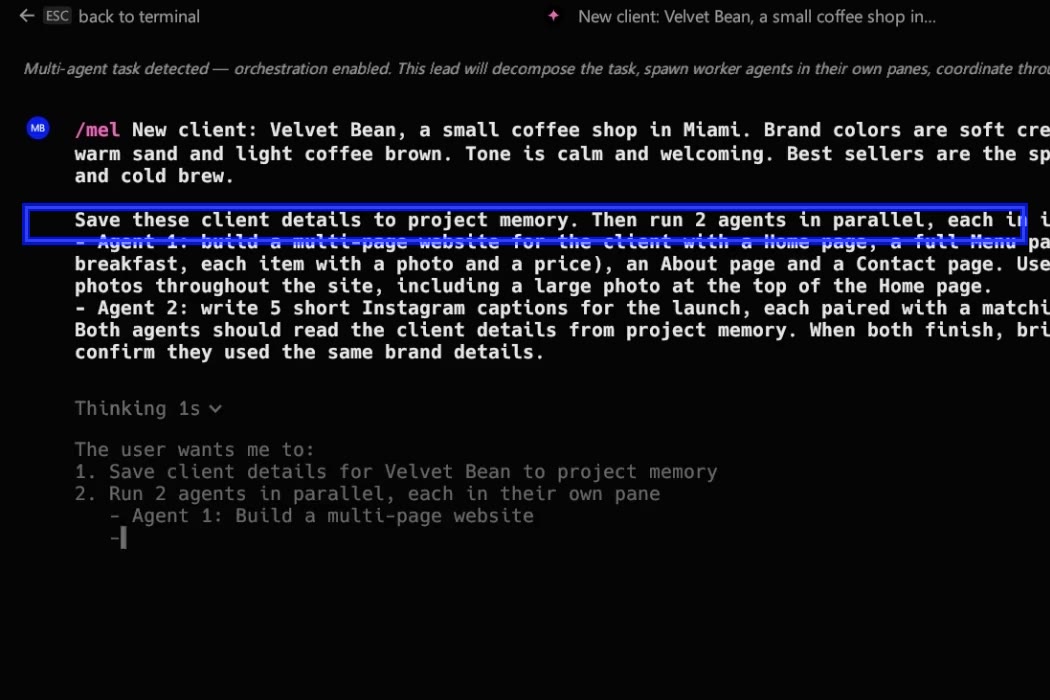
Start a conversation
Press Ctrl+Enter (⌘↵ on a Mac) at the terminal prompt. Whatever you already typed becomes the first message. You can also type /mel. New tabs start in the agent by default (Settings ▸ Features ▸ Open new sessions in the Mel agent is on; turn it off to start in the shell).
Write the task like a ticket
A good task answers four questions:
- What is the goal? "Fix the failing checkout test", not "look at the tests".
- Where? The folder, the file or the service.
- What are the limits? "Don't change the public API", "keep the old config working".
- How do we know it's done? The command that must pass, for example
npm test.
Give it context
The agent can always read and search files in the pane's folder with its own tools. These are the ways to put something in front of it on purpose.
| Context | How to add it | How long it lasts |
|---|---|---|
| A terminal block (command + output) | Right-click a block ▸ Attach as agent context, the paper-clip icon in the block header, or Ctrl+↑ at the prompt for the last command. After a failed command the hint row offers it too | This message |
| A file path | Drag a file from the project explorer onto the prompt to add its path; the agent reads it with its tools | This message |
| Images and PDFs | The + button in the input footer, or drag an image in. PDFs on models that can read them. See Image attachments | This message |
| A pinned file or note | /pin <path>, /pin note <text>, or right-click a file in the explorer ▸ Pin to agent context. /pins lists them, /unpin removes one | Every turn in this project |
| Project rules | A MEL.md in the project (Mel also reads AGENTS.md and CLAUDE.md), or ~/.mel/MEL.md for every project. See Rules & MEL.md | Every turn |
| Your Drive rules | *.rules.md files in Mel Drive, switched on in Settings ▸ Knowledge | Every turn |
| Project memory | Ask the agent to remember a decision; it is recalled in later conversations. See Project memory | Across conversations |
| Skills and saved prompts | Skills load by themselves when a task matches; a saved prompt runs as /name. See Library | When used |
| A link | Paste a URL and the agent can read the page with its web tools. See Web search | This message |
| A plan | A saved plan's menu ▸ Attach to active session. See Planning | This message |
In VS Code, Mel: Add file to context and Mel: Ask about selection do the same from the editor. See Mel for VS Code.
Everything you attach counts toward the context gauge in the input footer. Secrets in tool results are masked before the model sees them; see Security & privacy.
Ask for a plan on big changes
For anything that touches many files, start with /plan. Mel researches, writes the plan, and changes nothing until you approve. See Planning.
Keep the conversation focused
- One conversation per task works best. Start a new one when the topic changes.
- When a long conversation fills its context window, Mel compacts it.
/compact <focus>steers the summary toward what you still need.
FAQ
How do I give an AI agent context from my terminal? Right-click the block with the output and choose Attach as agent context, or press Ctrl+↑ at the prompt to attach the last command and its output.
Can I @-mention a file? Not with @. Drag the file from the project explorer to add its path, pin it with /pin <path>, or just name the file in your message; the agent reads it with its tools.
Does a longer prompt mean a better answer? Not by itself. A short prompt with the goal, the limits and the check beats a long one without them.
Can I talk to Mel while it works? Yes. Type a follow-up while a turn is running: Enter sends it into the running turn now, and Ctrl+Enter queues it for when the turn finishes.
What if I type a command instead of a question? Mel runs it in the shell. See Shell or agent.