
Reviewing the agent's changes
The diff before it's written, diff cards after, and the review panel to accept and commit.
Mel shows you every change the agent makes three times: as a diff on the approval card before it's written, as a diff card in the conversation after it's written, and in the code review panel, where you can accept, undo, stage and commit it.
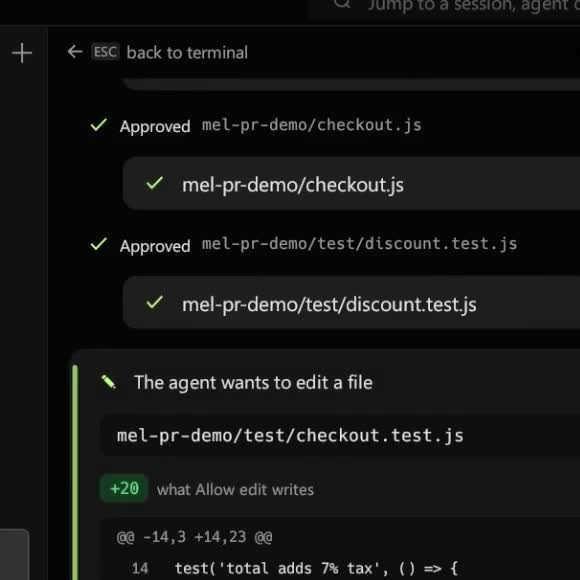
Before: the approval card
When the agent wants to write or edit a file, the approval card shows the unified diff of exactly what will be written: the same text the write will use, not a summary. Read it and choose:
- Allow edit for this one change;
- Always allow file edits in this conversation, to stop being asked for edits until the conversation ends;
- Deny (or Esc), and the agent is told and changes course.
Allow doesn't react for a moment after the card appears, so a key you were already pressing can't approve it. See Tools & approvals.
After: diff cards in the conversation
Every applied edit leaves a diff card: the file path, +N and -N counts, and the changed lines in red and green. The turn's usage line totals the files changed and lines applied.
If an edit leaves a file that no longer parses (for example a JSON file with a trailing comma), Mel adds a line saying so under the result, and the agent sees it too.
The code review panel
Click ± Review changes under a turn that edited files, press Ctrl+Shift+= (⌘⇧= on a Mac), or run Open Code Review from the command palette. The panel opens beside the conversation and shows the project's diff, one card per file.
- Accept stages one change, and Undo takes one change back out of your files.
- Approve stages every file shown.
- Attach diff puts the diff in the agent's message box, so you can ask about it.
- Commit: type a message and click Commit N files.
- ↩ Discard reverts one file, and ↩ Discard all reverts every tracked change after you confirm.
- Hover a line and click 💬 to leave a comment, then send your comments to the agent to fix. See Diffs & comments.
To open the panel by itself on a conversation's first change, turn on Auto open code review panel in Settings ▸ Editor and Code Review. More in Code review panel.
A good review loop
- Let the agent finish the task.
- Open the review panel and read each file.
- Comment on what's wrong and send the comments to the agent.
- When it's right, Approve and Commit.
Limitations
- The review panel needs a git repository. Outside one, you still get the approval card and the diff cards.
- The panel shows at most 40 files and 400 lines per file. Use
git diffin the terminal for more.
FAQ
Can I undo everything the agent did? In a git repository, ↩ Discard all reverts tracked changes. Files the agent created are untracked; discard them one by one from their cards.
Does the VS Code extension show diffs too? Yes. Each changed file gets a card, and Open diff opens VS Code's diff editor. See VS Code extension.