Claude Code alternatives: what to use when you hit the limits
October 23, 2026 · 4 min read
- Claude Code is a strong agent. People look elsewhere because of usage limits, one model family, team billing or wanting AI in the editor.
- Codex CLI and Gemini CLI are the closest match, and each works best with its own company's models.
- OpenCode and Aider suit people who want open source. Cursor and GitHub Copilot suit editor-first work.
- Mel runs Claude Code, Codex and OpenCode as workers and can switch models, so a team does not have to give Claude Code up.
Claude Code is one of the strongest coding agents you can use today. It is also tied to one company's models, and its plans come with usage limits. When you reach a limit in the middle of a task, you need a plan B. This guide looks at the main Claude Code alternatives, what each is good at, and how to keep Claude Code in your stack while you add other options.
Why people look for Claude Code alternatives
There are a few common reasons, and none of them mean Claude Code is a bad tool.
- Usage limits. Every hosted plan has limits. A long refactor or a big debugging session can reach them, and then you wait.
- One model family. Claude Code is built around Claude models. Some steps may go better on a different model, and you cannot switch inside the tool.
- Team billing. Several developers on separate subscriptions means several bills to track.
- Where you work. Some people want AI inside the editor instead of the terminal.
Tip: before you switch tools, write down what you actually hit: a usage limit, a missing model, or a billing problem. Each one has a different fix.
What is the best alternative to Claude Code?
The best alternative to Claude Code depends on why you are leaving: if you want other models in the terminal, try an agent that supports several models; if you want AI in your editor, try Cursor or GitHub Copilot.
| Tool | What it is | Good for |
|---|---|---|
| Codex CLI | OpenAI's coding agent in the terminal | Developers who want OpenAI models in the terminal |
| Gemini CLI | Google's open-source coding agent in the terminal | Developers who want Gemini models in the terminal |
| OpenCode | An open-source coding agent for the terminal | People who want an open-source terminal agent |
| Aider | An open-source pair programmer for the terminal | Developers who bring their own API key |
| Cursor | A code editor built around AI | People who want AI inside the editor |
| GitHub Copilot | AI help inside GitHub and popular editors | Teams already on GitHub |
| Mel | The agentic terminal that plans, builds, tests and ships | Teams who want Claude Code plus other models, approvals and one bill |
Codex CLI and Gemini CLI
These are the closest match to Claude Code. Each is a terminal agent from the company that makes the models, and each works best with its own company's models. Switching from Claude Code to one of them gives you a different model family, but you are still tied to one company.
OpenCode and Aider
Both are open source and run in the terminal. They are a good fit if you want to see how the tool works, change it, and bring your own API key.
Cursor and GitHub Copilot
These put AI inside the editor. They suit work where you write and change most of the code yourself, with AI help along the way.
What can I use when Claude Code hits its usage limit?
When Claude Code hits its usage limit, you can wait for the limit to reset, move the task to another agent that uses a different model, or use a tool that lets you switch models without leaving your work.
Waiting is fine for a side project, but harder when a release is due. Moving to a second agent works, but you start again in a new tool. The third option is the one Mel is built for.
You do not have to give up Claude Code
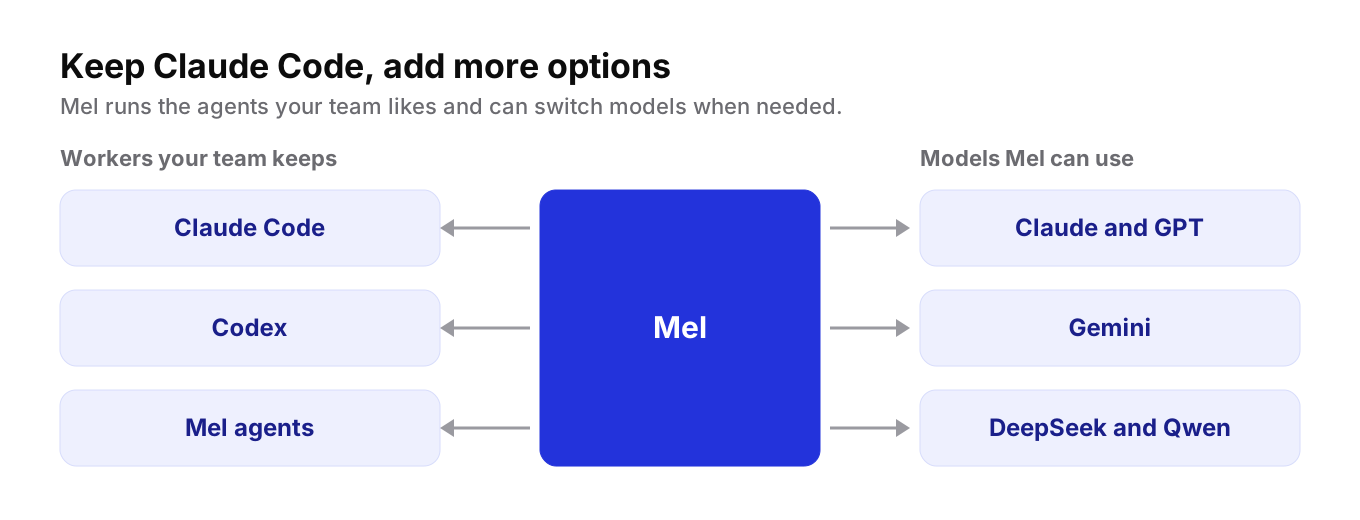
Mel is the agentic terminal that plans, builds, tests and ships your work, from prompt to production-ready code, with you in control. It is the AI terminal for teams.
Mel can run Claude Code, Codex and OpenCode as workers, so your team keeps the tools it already likes. Mel itself can also work with Claude, GPT, Gemini, DeepSeek and Qwen. That gives you two ways forward when one tool is not enough:
- Keep Claude Code as a worker. Developers who like Claude Code can keep using it, inside the same terminal as the rest of the team.
- Switch models when you need to. If a step needs a different model, Mel can use it, without a second tool and a second setup.
Mel is a team of agents in one terminal: it plans the work, writes the code, runs the tests and ships it. Configurable approvals keep you in control of commands and edits. It runs on Mac, Windows and Linux, and there is a VS Code extension.
Price: Mel is free with your own API key (your provider's usage charges apply). Pro is $20 a month with 1,500 hosted AI credits a month, and Max is $200 a month. See pricing.
For teams, the Business plan gives everyone shared credits and one invoice, so you do not track a separate subscription for each person.
How to choose
- Happy with Claude, just want more room? Keep Claude Code, and add a second option for the days you reach a limit.
- Want a different model family in the terminal? Codex CLI or Gemini CLI.
- Want open source? OpenCode or Aider.
- Want AI in the editor? Cursor or GitHub Copilot.
- A team that wants Claude Code and other models in one place, with approvals and one bill? Try Mel.
Claude Code is a strong tool. Often the real question is not what replaces it, but what to use next to it.
Try Mel
Download Mel for free on Mac, Windows or Linux, or book a 15-minute demo for your team.

Lalla is a hands-on tech founder, agentic infrastructure architect and the vision behind Mel.
Follow on LinkedIn