How to use Claude, GPT and Gemini in one coding tool
October 25, 2026 · 4 min read
- You can use several AI models in one coding tool if it supports several providers and lets you switch between them.
- There is no single best model for coding. The right one depends on the step: plan, write, fix or review.
- Test models on your own tasks, and use a different model to review a change than the one that wrote it.
- Mel works with Claude, GPT, Gemini, DeepSeek and Qwen in one terminal, and can run Claude Code and Codex as workers.
Claude, GPT and Gemini are all strong at coding, and each one has days when it is the better pick. Most coding tools are built around one of them. Multi-model AI coding means using several models from one place, and picking the right one for each step instead of for the whole project. This guide explains why that helps and how to set it up.
Can I use several AI models in one coding tool?
Yes, you can use several AI models in one coding tool, as long as the tool supports more than one model provider and lets you switch between them.
There are three common ways to do it:
- Run several tools side by side. For example, one terminal agent for Claude and another for GPT. This works, but you set up each tool, learn each one, and move context by hand.
- Use an open-source tool with your own keys. Tools such as Aider, Cline and OpenCode can connect to more than one provider. You manage the API keys yourself.
- Use a tool built for several models. The tool connects to several providers, and you pick a model for each task, or let it choose.
Which AI model is best for coding?
There is no single best AI model for coding: the right model depends on the step, such as planning, writing code, fixing a failing test or reviewing a diff.
Benchmarks change often and rarely match your project. A better test is your own work. Try two models on the same real task and compare the result, the time it took and the cost.
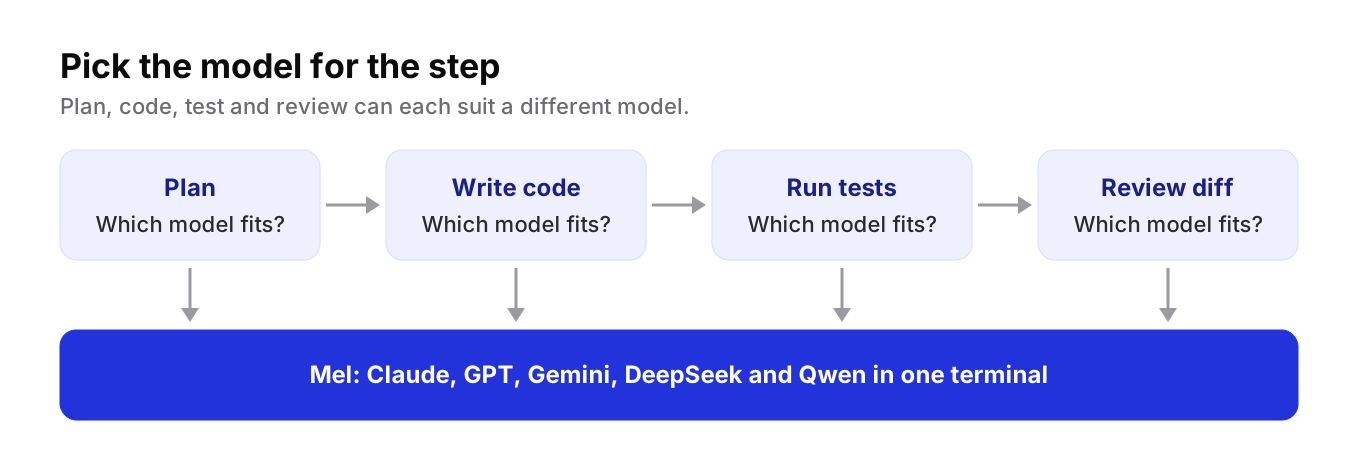
Here is a simple way to think about each step.
| Step | What matters most | Questions to ask |
|---|---|---|
| Plan | Careful reasoning over the whole project | Does the plan match how the code is really built? |
| Write code | Correct, readable changes | Does it follow the style of the files around it? |
| Fix a failing test | Reading errors and trying again | Does it fix the cause, or only the symptom? |
| Review a diff | A fresh look | Does a different model catch what the first one missed? |
| Small edits | Speed and cost | Is a fast, low-cost model good enough here? |
Tip: use a different model to review a change than the one that wrote it. A second model is more likely to question choices the first one took for granted.
Why one tool beats several
Switching between tools has a cost that is easy to miss.
- Context. Each tool starts from zero. You explain the task again, and paste the same files again.
- Setup. Each tool has its own settings, keys and habits to learn.
- Billing. Several subscriptions means several bills, which is harder still for a team.
- Control. Each tool has its own rules for what the agent may do without asking. Keeping them in line takes work.
One tool with several models keeps the task, the history and the rules in one place. You change the model, not the tool.
How to use Claude, GPT and Gemini in Mel
Mel is the agentic terminal that plans, builds, tests and ships your work, from prompt to production-ready code, with you in control. It is the AI terminal for teams.
Mel works with Claude, GPT, Gemini, DeepSeek and Qwen. You can pick the model for a task, or let Mel choose one for each step. Mel is a team of agents in one terminal: it plans the work, writes the code, runs the tests and ships it.
If your team already likes a particular coding agent, Mel can also run Claude Code and Codex as workers. So a developer can keep Claude Code for one task while Mel uses GPT or Gemini for another, in the same terminal.
A simple way to start:
- Install Mel on Mac, Windows or Linux, or add the VS Code extension.
- Pick how you pay. Use your own API key for free (your provider's usage charges apply), or use hosted credits on a paid plan.
- Give it a real task. Something with a clear finish line, such as "make this test pass".
- Try a second model on the same task. Compare the results and keep the one that did better for that kind of step.
Configurable approvals keep you in control of commands and edits, whichever model is doing the work.
Price: Mel is free with your own API key. Pro is $20 a month and includes 1,500 hosted AI credits a month, and Max is $200 a month. Business gives a team shared credits and one invoice. See pricing.
What to remember
- No model is best at every step. Plan, code, test and review can each suit a different model.
- Judge models on your own tasks, not on a chart.
- One tool with several models saves the context, setup and billing that several tools cost you.
Try Mel
Download Mel for free on Mac, Windows or Linux, or book a 15-minute demo for your team.

Lalla is a hands-on tech founder, agentic infrastructure architect and the vision behind Mel.
Follow on LinkedIn