What is an agentic terminal?
October 24, 2026 · 4 min read
- An agentic terminal lets an AI agent take a task from a prompt to a finished result by running commands and editing files.
- A normal terminal does only what you type. An AI chat suggests code but cannot see your files or run anything.
- Look for control over commands and edits, the whole job from plan to tests, several models and support for every computer.
- Mel is the agentic terminal for teams: a team of agents, several models, Claude Code and Codex as workers, and configurable approvals.
An agentic terminal is a command line with an AI agent built in. You describe the work in plain words, and the agent plans it, runs the commands, edits the files and checks the result, while you decide what it may do. This article explains what that means, how it differs from a normal terminal or an AI chat, and what to look for when you pick one.
What is an agentic terminal?
An agentic terminal is a terminal where an AI agent can take a task from a prompt to a finished result by running commands and editing files for you, under your control.
A normal terminal waits for you to type each command. An agentic terminal still lets you do that, but it can also take a goal, such as "add a login page and make the tests pass", and work through the steps itself:
- Plan. It reads the project and decides what needs to change.
- Build. It writes and edits the code.
- Test. It runs the build and the tests, reads the errors, and fixes them.
- Ship. It gets the change ready for you to review and merge.
The important word is "agentic". The AI does not only suggest. It acts, and it sees the results of what it did.
How is an agentic terminal different from a normal terminal or an AI chat?
An agentic terminal differs because it both understands your request, like an AI chat, and runs the work on your machine, like a terminal, so you do not copy and paste between the two.
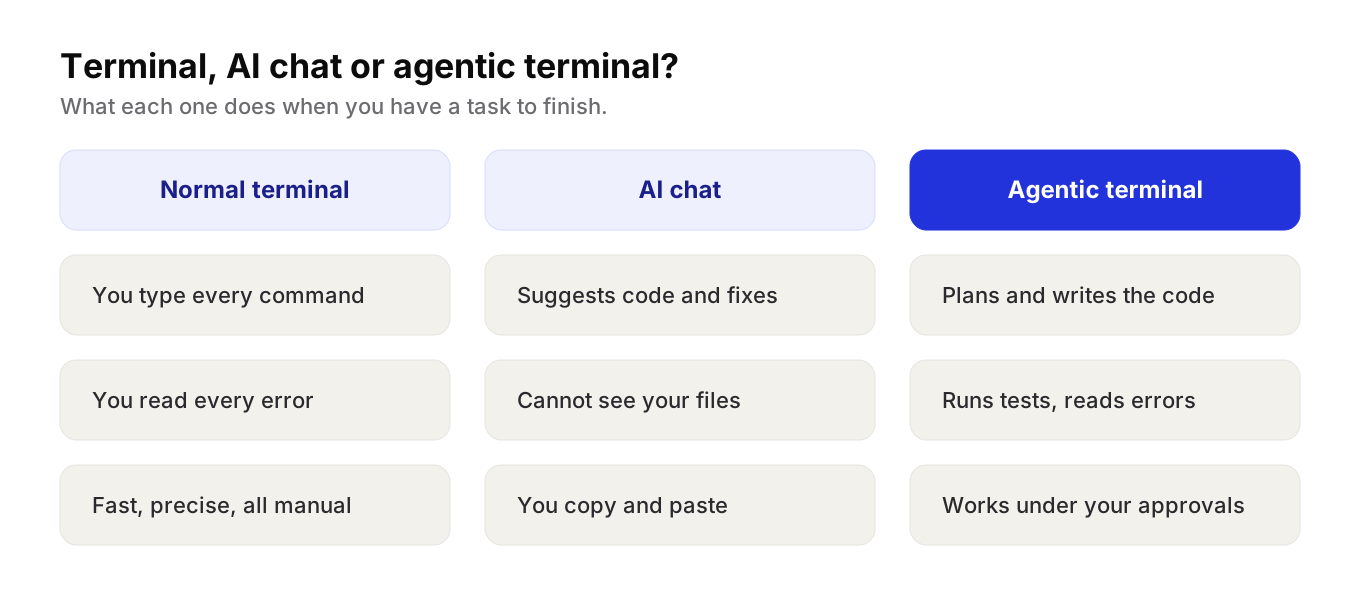
| Normal terminal | AI chat | Agentic terminal | |
|---|---|---|---|
| Who types the commands | You | You, after copying them | The agent, under your approvals |
| Sees your project | Yes | Only what you paste | Yes |
| Runs the tests | When you run them | No | Yes, and reads the errors |
| Acts on errors | When you do | Only if you paste the error back | Yes, it reads them and tries a fix |
| Who stays in control | You | You | You, through approvals |
A normal terminal
A terminal is fast and precise. It does exactly what you type and nothing more. The cost is that every step is yours: you look up the flags, read the error, and try again.
An AI chat
A chat window can explain an error or write a function. But it cannot see your files unless you paste them, and it cannot run anything. You become the go-between, moving text from one window to the other.
An agentic terminal
An agentic terminal closes that loop. The agent reads the files it needs, runs the command, sees the output, and changes course. You spend your time on decisions, not on copying text.
Tip: the first time you try an agentic terminal, give it a small, real task with a clear finish line, such as "make this failing test pass". You will learn more than from a demo prompt.
What to look for in an agentic terminal
- Control. The agent runs commands and edits files. You need to decide what it may do on its own and what it must ask first.
- The whole job. Writing code is one step. Running the tests and fixing what breaks is where the time goes.
- More than one model. No single model is best at every step. A terminal that can switch models gives you more options.
- The tools you already use. If your team likes a particular coding agent, it helps when the terminal can run it.
- Every computer. Teams mix Mac, Windows and Linux, and many people also work in VS Code.
What is the best agentic terminal?
The best agentic terminal is the one that does the whole job, plan, build, test and ship, while keeping you in control of commands and edits, with the models and tools your team already uses.
Terminal agents such as Claude Code, Codex CLI, Gemini CLI and OpenCode are strong options for one developer. Each is a coding agent that runs inside your existing terminal, and the ones from model companies work best with their own models. If that fits how you work, they are a good start.
Mel is the agentic terminal that plans, builds, tests and ships your work, from prompt to production-ready code, with you in control. It is the AI terminal for teams.
- A team of agents in one terminal. Mel plans the work, writes the code, runs the tests and ships it.
- Keep the tools you like. Mel can run Claude Code and Codex as workers.
- Several models. Claude, GPT, Gemini, DeepSeek and Qwen.
- You stay in control. Configurable approvals keep you in control of commands and edits.
- Works where you work. Mac, Windows and Linux, plus a VS Code extension.
Price: Mel is free with your own API key (your provider's usage charges apply). Pro is $20 a month and Max is $200 a month. See pricing.
Try Mel
Download Mel for free on Mac, Windows or Linux, or book a 15-minute demo for your team.

Lalla is a hands-on tech founder, agentic infrastructure architect and the vision behind Mel.
Follow on LinkedIn