
VS Code extension
Mel's agent in VS Code, on your Mel plan.
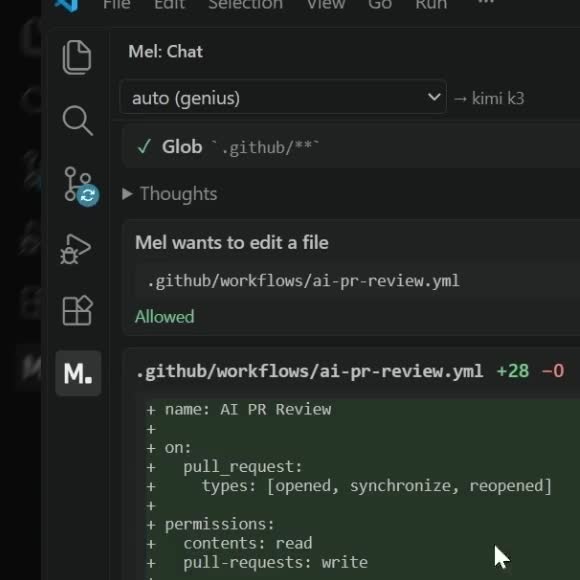
Mel for VS Code (mel.openmel on the VS Code Marketplace and Open VSX) puts Mel's AI coding agent in a view beside your code. It is the same agent as the Mel app, on your Mel plan: the extension is a window onto the Mel app on your computer, so the app does the work with your signed-in account, and a conversation you start in VS Code is in Mel too.
What you need
- The Mel app, version 0.1.48 or newer, installed on this computer. Download Mel.
- Signed in to Mel. Open the Mel app once and sign in. The extension uses that session.
- A Mel plan that includes Mel in VS Code. Every plan that can use the Mel app does.
The extension finds Mel on your PATH or where its installer puts it (%LOCALAPPDATA%\Programs\Mel on Windows, /Applications/Mel.app on macOS, ~/.local/bin on Linux). If yours is somewhere else, set mel.path in your VS Code settings.
What it does
- Chat in the Mel view in the activity bar. Answers stream in as Markdown, with Mel's thoughts folded away and the model, tokens and time under each answer.
- Tool cards for every file Mel reads and every command it runs. Expand one to see its output.
- Approvals. Allow once, allow for this conversation, or deny. These are the Mel app's own approval rules, including what you set in Settings ▸ Agent mode: a command Mel can prove only reads runs without a card. Every connector or MCP call stops for your approval, and so does a step that cannot be undone, a credential file and a write outside the project; those never offer "allow for this conversation".
- Questions. When Mel needs a decision only you can make, it puts the question to you and carries on from your answer.
- Diffs in VS Code's diff editor. Every file Mel changes gets a card, and Open diff shows the file before and after.
- Stop a turn at any time. While Mel works, Enter queues your next message for when it finishes, and Ctrl+Enter (⌘+Enter on macOS) sends it into the running turn. (In the Mel app it's the other way round.)
- Models. Pick
autowith any of its modes, or any model the Mel app offers. See Models & pricing. - Conversations. The same list as in the Mel app. Resume any of them here.
Commands
| Command | Keys |
|---|---|
| Mel: Focus the chat | Ctrl+Alt+M (⌘⌥M) |
| Mel: Ask about selection | Ctrl+Alt+K (⌘⌥K) |
| Mel: Add file to context | editor and Explorer menus |
| Mel: Start a task in this folder | Explorer menu on a folder |
| Mel: Open in Mel | view title bar, Explorer menu |
| Mel: New conversation | Ctrl+Alt+N (⌘⌥N) in the Mel view |
| Mel: Conversations · Mel: Stop · Mel: Show log |
The chat follows your VS Code theme: light, dark and high contrast.
Open files between Mel and your editor
- From Mel's output: Ctrl+click (⌘-click on a Mac) a file path in a command's output. Mel opens it in the app your system uses for that file type, so set VS Code as the default app for code files to open them there. A folder opens in your file manager.
- From the shell: type
code <file>in a Mel tab, as in any terminal, if VS Code'scodecommand is installed. - In Mel itself:
/open-fileopens any project file in Mel's built-in editor. - From VS Code to Mel: Mel: Open in Mel (Explorer menu or the view's title bar) opens the Mel app at that folder, and Mel: Add file to context hands a file to the conversation.
| Action | Keys |
|---|---|
| Open a path from Mel's output | Ctrl+click (⌘-click on a Mac) |
| Focus the Mel chat in VS Code | Ctrl+Alt+M (⌘⌥M) |
| Ask Mel about the selection | Ctrl+Alt+K (⌘⌥K) |
Privacy
The extension itself sends nothing anywhere. It talks only to the Mel app on your computer, over a local pipe, and never sees your session token. What the Mel app sends is exactly what it sends when you use it directly. See Security & privacy.
Limitations
- The extension needs the Mel app on the same computer. It can't run on its own or connect to Mel on another machine.
- Settings, connectors, provider keys and the Library are managed in the Mel app.
Troubleshooting
The extension can't find Mel. Install the Mel app, or set mel.path to where it is.
On a Mac, it started an old copy of Mel. Keep one copy of Mel, in your Applications folder, or set mel.path to the one you want.
It says I'm signed out. Open the Mel app and sign in, then try again.
FAQ
How do I open a file from the terminal in VS Code? Ctrl+click (⌘-click on a Mac) the path in Mel's output with VS Code set as your default app for that file type, or run code <file>.
Does it cost extra? No. It runs on your Mel plan, and turns use credits exactly as they do in the app.
Can I use my own API keys? Yes. Keys you add in the Mel app (Settings ▸ AI) are used in VS Code too, because the app does the work.