Mel – the agentic terminal
The AI terminal for teams.
AI coding agents in VS Code: what to use
November 2, 2026 · 4 min read
- GitHub Copilot fits teams on GitHub; Cline is an open-source agent for VS Code; Cursor is its own AI editor.
- You can run terminal agents like Claude Code or Codex CLI in VS Code's built-in terminal.
- Mel's VS Code extension is the same agent as the Mel app, on your Mel plan, from the Marketplace or Open VSX.
- For a team, compare approvals, models and billing, not only features.
VS Code is where many developers spend their day, so it is natural to want an AI agent VS Code can host right next to your code. There are several good options, and they work in different ways. Some suggest code as you type, some act as an agent that edits files and runs commands, and one is a separate editor built around AI. This guide explains the main choices in plain terms, so you can pick what fits how you work.
What is an AI coding agent?
An AI coding agent is a tool that takes a task in plain language and does the work in your project: it reads the code, edits files and runs commands. That is different from autocomplete, which only suggests the next lines while you type. Many tools now offer both.
The main options for VS Code
| Tool | What it is | Best for |
|---|---|---|
| GitHub Copilot | AI help inside GitHub and popular editors, including VS Code | Teams already standardized on GitHub |
| Cline | An open-source coding agent for VS Code | VS Code users who want an open-source agent |
| Cursor | A code editor built around AI | People who are happy to switch editors |
| Claude Code and Codex CLI | Coding agents that run in a terminal | Developers who like working from the terminal |
| Mel | The agentic terminal, with a VS Code extension | Teams who want one agent across the terminal and VS Code |
GitHub Copilot
GitHub Copilot is made by GitHub and works inside GitHub and popular editors, VS Code included. It is a good fit for teams that already live in GitHub and want AI help in the tools they already use.
Cline
Cline is an open-source coding agent that runs inside VS Code. It works with your own API key. It is a good fit for people who want an agent in the editor and want to see how the tool works.
Cursor
Cursor is not a VS Code extension. It is its own code editor, built around AI. It is a good fit for people who want AI at the center of the editor and are happy to move to a new one.
What is the best AI agent for VS Code?
The best AI agent for VS Code depends on how you work: GitHub Copilot fits teams on GitHub, Cline fits people who want open source, and Mel fits teams who want the same agent in the terminal and in the editor. There is no single winner for everyone.
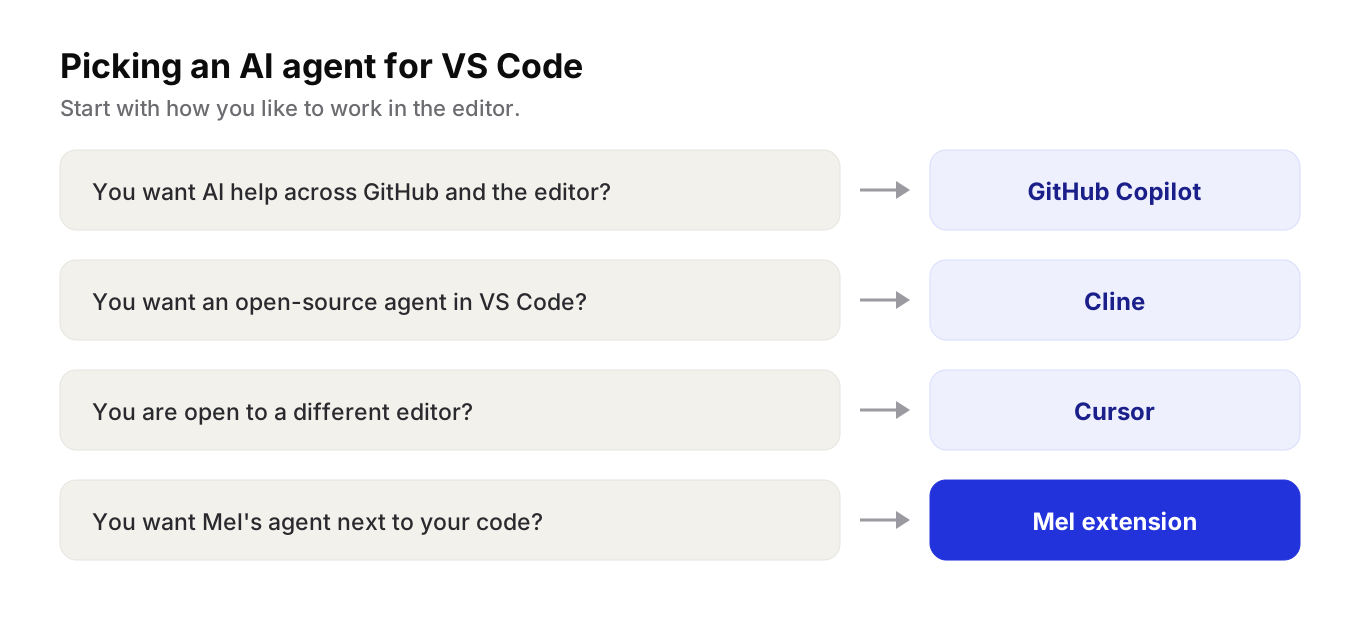
Ask these questions first:
- Do you want suggestions as you type, or an agent that does whole tasks? Many tools do both, but they lean one way.
- Do you want to stay in VS Code? If yes, Cursor is a bigger change, because it is a separate editor.
- Does open source matter to you? Cline is open source.
- Is this for a team? Then think about approvals, models and billing, not only features.
Tip: try each option on the same real task in your own project. A small bug you already understand makes the results easy to compare.
Can I use a terminal agent from VS Code?
Yes, you can run a terminal agent such as Claude Code or Codex CLI in VS Code's built-in terminal, the same way you would run any command-line tool. That works well when you like the agent and want to stay in the editor window.
The trade-off is that a terminal agent in a terminal panel is still a separate tool. Its chat, its approvals and its history live in that terminal, not in the rest of your editor. And each of these agents is built around its own company's models.
Mel in VS Code
Mel is the agentic terminal that plans, builds, tests and ships your work, from prompt to production-ready code, with you in control. It runs on Mac, Windows and Linux, and there is a VS Code extension.
- The same agent in two places. Install Mel as an extension and open it next to your code. It is the same agent as the Mel app, on your Mel plan.
- Easy to find. Get it from the VS Code Marketplace or Open VSX.
- A team of agents. Mel plans the work, writes the code, runs the tests and ships it. It can also run Claude Code and Codex as part of its team of agents.
- The leading models. Claude, GPT, Gemini, DeepSeek and Qwen.
- You stay in control. Configurable approvals keep you in control of commands and edits.
- Built for teams. The Business plan gives the team shared credits and one invoice.
The app is in English.
Price: Mel is free with your own API key (your provider's usage charges apply). Pro is $20 a month and Max is $200 a month. See pricing.
How to choose
- Your team lives in GitHub? Start with GitHub Copilot.
- You want an open-source agent inside VS Code? Try Cline.
- You are ready to switch editors? Look at Cursor.
- You want one agent across the terminal and VS Code, with the leading models and one bill? Try Mel.
Try Mel
Download Mel for free on Mac, Windows or Linux, or book a 15-minute demo for your team.

Lalla is a hands-on tech founder, agentic infrastructure architect and the vision behind Mel.
Follow on LinkedIn