Mel – the agentic terminal
The AI terminal for teams.
Codex CLI vs Claude Code vs Mel
October 31, 2026 · 4 min read
- Codex CLI is OpenAI's open-source terminal agent; Claude Code is Anthropic's. Both read code, edit files and run commands.
- Neither is better for everyone: pick the one built around the models your team prefers, and test it on a real task.
- You can use both together: Mel can run Claude Code and Codex as part of its team of agents in one terminal.
- Mel adds Claude, GPT, Gemini, DeepSeek and Qwen, configurable approvals and one invoice for the team.
If you are comparing Codex CLI vs Claude Code, you are choosing between two strong coding agents that live in the terminal. Both read your project, edit files and run commands. The real difference is which company makes each one and which models it is built around. This guide compares the two fairly, then shows where Mel fits for a team that does not want to pick just one.
What is Codex CLI?
Codex CLI is OpenAI's open-source coding agent for the terminal. You give it a task in plain language, and it reads your code, proposes changes and runs commands in your project. It is built around OpenAI's models, so it is a natural pick for developers who already like GPT.
What is Claude Code?
Claude Code is Anthropic's coding agent for the terminal. It works the same way at a high level: you describe the job, and it explores the code, edits files and runs commands. It is built around Anthropic's Claude models, so it is a natural pick for developers who already like Claude.
Codex CLI vs Claude Code vs Mel at a glance
| Codex CLI | Claude Code | Mel | |
|---|---|---|---|
| Who makes it | OpenAI | Anthropic | Mel |
| Models it is built around | OpenAI's models | Anthropic's Claude models | Claude, GPT, Gemini, DeepSeek and Qwen |
| Where it runs | Your terminal | Your terminal | A desktop terminal app on Mac, Windows and Linux, plus a VS Code extension |
| Best for | Developers who want OpenAI models in the terminal | Developers who want Claude models in the terminal | Teams who want one terminal, the leading models and one bill |
This table stays general on purpose. Each tool changes often, so check each company's own pages for current prices, limits and models.
Codex CLI or Claude Code: which is better?
Neither is better for everyone; the better one is the one built around the models your team prefers. If your developers get the best results from GPT, Codex CLI is the simpler start. If they get the best results from Claude, Claude Code is.
A few honest points help you decide:
- Model fit matters most. Each agent works best with its own company's models. Try the same real task in both and compare the results on your own code.
- Open source can matter. Codex CLI is open source, which suits teams that want to read or change how the tool works.
- Habits matter too. Some people on a team will prefer one, some the other. Forcing everyone onto one tool can cost more than it saves.
Tip: test both on a real task from your backlog, not a demo. A bug you already understand is a good test, because you can judge the fix.
Can I use Codex and Claude Code together?
Yes, and Mel is built for that: it can run Claude Code and Codex as part of its team of agents, so a team keeps the tools it likes. You do not have to choose one agent for the whole team.
Using both on your own means two tools, two setups and two bills. Each agent also only knows its own session. Nothing coordinates the work between them. That is where a terminal designed for a team of agents helps.
Where Mel fits
Mel is the agentic terminal that plans, builds, tests and ships your work, from prompt to production-ready code, with you in control. It is the AI terminal for teams.
- A team of agents in one terminal. Mel plans the work, writes the code, runs the tests and ships it.
- Your agents in the team. Mel can run Claude Code and Codex as part of its team of agents. The person who likes Claude Code keeps it, and so does the person who likes Codex.
- The leading models. Mel's own agent works with Claude, GPT, Gemini, DeepSeek and Qwen, so you are not tied to one company's models.
- You stay in control. Configurable approvals keep you in control of commands and edits.
- One bill for the team. The Business plan gives the team shared credits and one invoice.
- Works where you work. Mac, Windows, Linux and VS Code. The app is in English.
Price: Mel is free with your own API key (your provider's usage charges apply). Pro is $20 a month and includes 1,500 hosted AI credits a month. Max is $200 a month. See pricing.
How to decide
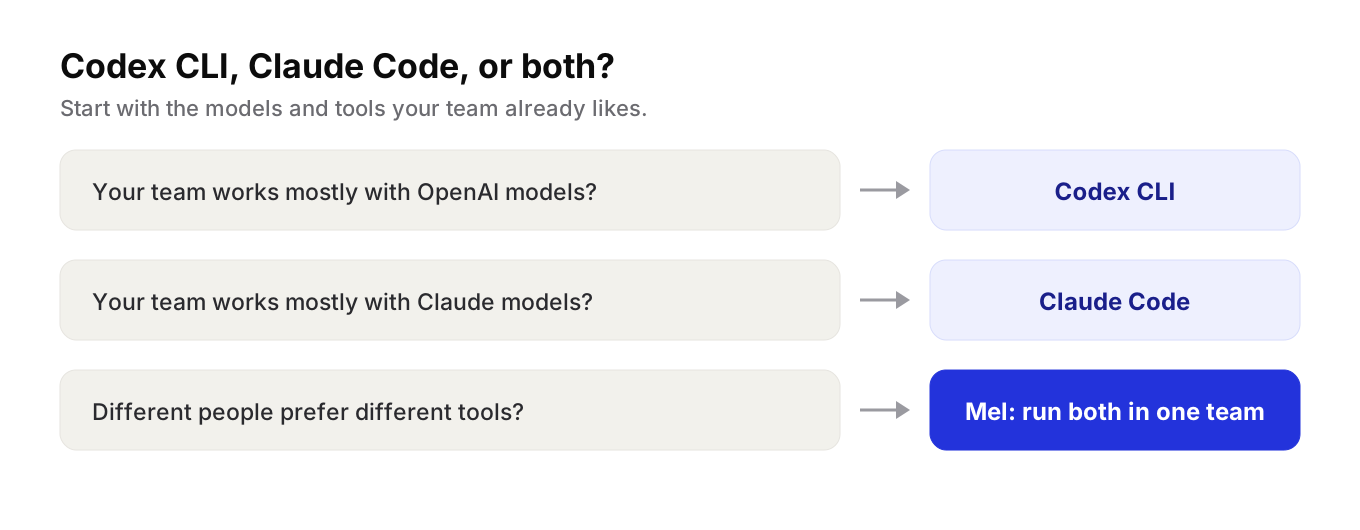
- Your team works mostly with OpenAI models? Start with Codex CLI.
- Your team works mostly with Claude models? Start with Claude Code.
- Different people prefer different tools, or you want more than one company's models? Try Mel and run both in one team of agents, in one terminal.
You can also start with one agent and add more later. The question to ask early is whether you want your tools to be tied to one model company, or free to use the best model for each step.
Try Mel
Download Mel for free on Mac, Windows or Linux, or book a 15-minute demo for your team.

Lalla is a hands-on tech founder, agentic infrastructure architect and the vision behind Mel.
Follow on LinkedIn