
Mel – the agentic terminal
The agentic team for coding.
How to fix failing tests with an AI agent
November 23, 2026 · Updated November 20, 2026 · 8 min read
- Tell the agent which command must pass and that it must fix the code, not the tests.
- Mel reads the test command from AGENTS.md and uses it to check its work.
- For a big red suite, ask for one cause at a time or let a lead agent split the work.
- Read every test change on the approval card before you allow it.
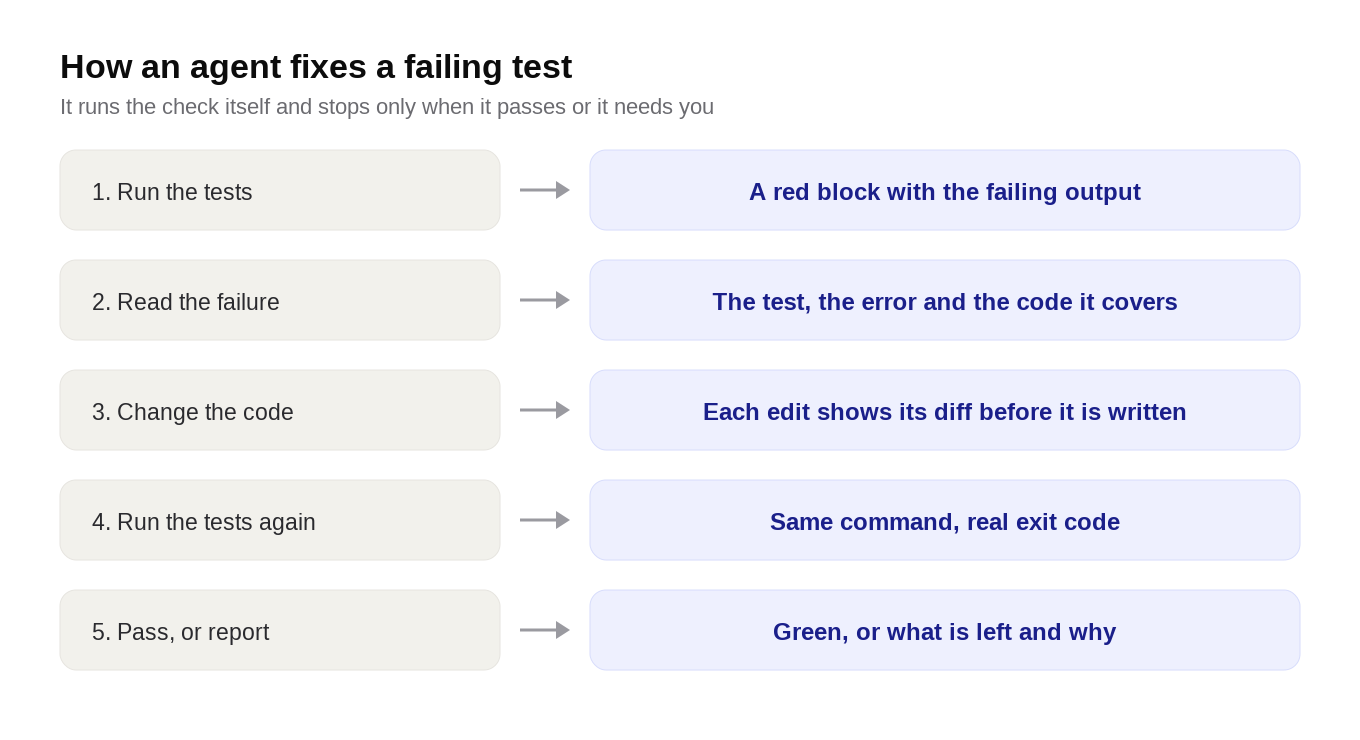
To fix failing tests with an AI agent, tell it which command must pass and what it may not touch, then let it run that command itself. In Mel – the agentic terminal (openmel.dev), put your test command in AGENTS.md or MEL.md, attach the failing output with Ctrl+↑ (⌃↑ on a Mac), and write a finish line such as "make pytest pass without skipping or deleting a test". Mel's agent reads the failing tests and the code, changes what it needs, and runs the tests again before it says it is done. You approve each edit and command that changes something, unless your settings allow it.
This guide covers the one rule that stops an agent from "fixing" tests the wrong way, how to set up your project once, the step-by-step in Mel, and how to handle a whole red test suite.
Why failing tests suit an AI agent so well
A failing test is one of the best tasks you can give an agent, because it comes with its own finish line. The agent does not have to guess what "done" means: the same command that failed must pass. It can run that command, read the exact error, change the code and run it again, as many times as it needs. A chat window cannot do that loop, because it cannot run anything; you would be copying errors back and forth by hand.
Three things decide whether the loop ends well:
| What decides it | Good | Bad |
|---|---|---|
| The check | One command, named in the task or the rules file | "Make the tests better" |
| The limits | "Fix the code, not the tests" | No limits, so a test can be loosened or skipped |
| The evidence | The failing output attached to the task | "Some tests fail, have a look" |
The one rule: fix the code, not the test
The fastest way to make a test pass is to change the test. An agent with no limits will sometimes do exactly that: loosen an assertion, skip the test, or delete it. Say what is off limits in every task:
Make `pytest` pass.
Fix the code, not the tests. Don't skip, delete or loosen any test.
If a test itself is wrong, stop and tell me why before changing it.
That last line matters. Sometimes the test really is wrong, and you want to decide that, not the agent.
Set up your project once
Mel's agent reads the rules files in your repository on every turn: AGENTS.md and CLAUDE.md, then MEL.md for rules meant only for Mel. If AGENTS.md names a test command, Mel uses it as the check to run before it says it is done. See rules and MEL.md.
A short AGENTS.md that works well:
## Tests
- Run tests with `pnpm test`. Run one file with `pnpm test path/to/file`.
- Fix the code, not the tests. Never skip or delete a test.
- Never edit files under `fixtures/`.
Write it once and every task in that project follows it, for you and for your teammates.
How to fix failing tests in Mel, step by step
- Run the tests in a Mel tab. A failed run gets a red ✗ badge and its block turns red.
- Attach the failure. Press Ctrl+↑ (⌃↑ on a Mac) to attach the last command and its output, or right-click the block and choose Attach as agent context.
- Write the finish line. Press Ctrl+Enter (⌘↵ on a Mac) and give the task, using the rule above.
- Approve edits as they come. Each edit shows its exact diff on an approval card before it is written. Each command that changes something shows the exact command.
- Let it check its own work. The agent runs the test command after it changes something. Starting a dev server or reading a file back does not count as a check.
- Review the result. Press Ctrl+Shift+= (⌘⇧= on a Mac) to open the code review panel and read every change before you commit.
When the whole suite is red
A hundred failing tests usually have a few causes. Don't ask for all of them at once.
| Situation | What to ask |
|---|---|
| Many tests fail with the same error | "Find the one cause of this error and fix it" |
| Tests fail after a dependency upgrade | "Make the tests pass on the new version without pinning back" |
| One test fails only sometimes | "Find why test_x is flaky. Run it 20 times to show it is fixed" |
| Tests fail in CI but pass locally | Attach the CI log and say which system CI runs on |
For a big suite, a lead agent can split the work. Type /orchestrate-cli or /orchestrate-agent and Mel's lead gives each worker its own files, then checks the combined result and runs the tests on disk. See orchestration.
Test commands the agent can run
Name the exact command. These are the usual ones, from each tool's own docs; your project may wrap them in a script:
| Language or tool | Run every test | Run one file or test |
|---|---|---|
| JavaScript with npm | npm test | depends on the runner, for example npx vitest run path/to/file.test.ts |
| Python with pytest | pytest | pytest tests/test_cart.py::test_total |
| Go | go test ./... | go test ./cart -run TestTotal |
| Rust with Cargo | cargo test | cargo test total |
| Java with Maven | mvn test | mvn test -Dtest=CartTest |
Running one test first is faster and cheaper: the agent sees a short output instead of a whole suite, and each run is quick. Ask it to run the single failing test while it works, then the whole suite once at the end.
Four prompts you can copy
One failing test
`pytest tests/test_cart.py::test_total` fails (output attached).
Fix the code, not the test. Run that test until it passes,
then run the whole suite once and tell me the result.
Tests broke after an upgrade
We upgraded React from 18 to 19 and 14 tests fail (output attached).
Make them pass on 19. Don't pin back, don't skip tests.
Group the failures by cause before you change anything.
A flaky test
`test_checkout_timeout` fails about one run in five.
Find why. Don't add retries or longer sleeps.
Show it is fixed by running it 20 times in a row.
Fails in CI, passes locally
The CI log is attached. CI runs on Ubuntu with Node 20; I am on macOS with Node 22.
Find what differs, fix the code, and tell me how you checked it.
How Mel checks that "done" means done
An agent saying "the tests pass" is a claim. Mel treats it as one:
- A real check counts, not a look. Starting a dev server or reading a file back is not a check; running the project's test command is (tools and approvals).
- Your command wins. If
AGENTS.mdnames a test command, Mel picks it up as the check to run (rules and MEL.md). - When it is stuck, it says so. A task that stops making progress ends with what was done and what is left, rather than looping.
Fixing tests from a script or CI
The same agent runs outside the app with mel agent, on the folder you run it in:
mel agent "make npm test pass without skipping or deleting a test"The answer streams to your terminal, and each command the agent runs or file it changes is printed on its own line. On macOS, set up the mel command once first: from v0.1.68, choose Install the mel command in the command palette (mel agent). Approvals still apply; read the page before you run it unattended.
Which model should fix the test?
Leave the model on auto and Mel picks one for each turn, or choose a mode: Cost-efficient for a simple assertion error, Genius for a hard bug that spans several files. If one model gets stuck, pick another from the model menu and send the same task; a fresh model often sees what the first one missed (model selection). On your own provider key, the turns cost 0 Mel credits.
Mistakes to avoid
- No finish line. "Look at the tests" never ends. "Make
npm testpass" does. - No limits. Without "fix the code, not the tests", you may get a passing suite that tests nothing.
- Approving a test change without reading it. The approval card shows the exact diff. A removed assertion is easy to spot there.
- Trusting the summary. Run the tests once yourself at the end.
Frequently asked questions
Can an AI agent fix failing tests? Yes, when it can run them. Mel's agent runs your test command, reads the output, changes the code and runs the tests again until they pass or it reports what is left.
How do I stop the agent from deleting tests? Say so in the task and in AGENTS.md: "Fix the code, not the tests. Never skip or delete a test." Every edit also shows its diff on an approval card before it is written.
Where do I tell Mel my test command? In AGENTS.md, CLAUDE.md or MEL.md in your repository. If AGENTS.md names a test command, Mel uses it as the check.
What if the agent can't fix it? A task that stops making progress ends with a report of what was done and what is left. Narrow the task, add a fact, or try another model from the model menu.
Can I undo the agent's changes? Yes. In the code review panel, Undo takes back one change and ↩ Discard reverts one file. See how to undo what an AI coding agent changed.
Should I run one test or the whole suite? One test while the agent works, the whole suite once at the end. It is faster and costs less.
Can I fix tests from CI with Mel? Yes, with mel agent "..." in the project folder. Read the approvals section of the mel agent page first.
Is it free? The terminal is free, and Mel's agent is free with your own API key. Paid plans start at $20 a month. See pricing.
Try it
Download Mel, add one line with your test command to AGENTS.md, run the tests, and hand the red block to the agent. For errors outside tests, read how to debug an error with an AI coding agent. To see it on your own code with your team, book a 15-minute demo.
*pytest, Go, Rust, Cargo, Maven, npm and React are trademarks of their owners. Mel is not affiliated with or endorsed by them.*
Mel – the agentic terminal · openmel.dev. The agentic team for coding.

Lalla is a hands-on tech founder, agentic infrastructure architect and the vision behind Mel.
Follow on LinkedIn