Mel – the agentic terminal
The AI terminal for teams.
Plan, build, test, ship: how Mel works
October 28, 2026 · 4 min read
- Mel reads your code first, then posts a live task list, or writes a plan for you to approve in plan mode.
- It edits files and runs commands on your machine, shows every change, and configurable approvals keep you in control.
- It runs the build and tests, reads the errors, fixes the code and runs them again until your checks hold.
- For bigger jobs a lead agent runs a team of agents, including Claude Code and Codex, and checks their work.
Mel is the agentic terminal that plans, builds, tests and ships your work, from prompt to production-ready code, with you in control. It is the AI terminal for teams.
Autocomplete and chat boxes suggest code. An AI agent that tests and ships code does more: it reads your project, makes a plan, changes the files, runs the commands that check the work and fixes what fails. This article walks through how Mel does that, step by step, and where you stay in control.
What does an agentic terminal do from prompt to production?
An agentic terminal takes your prompt, plans the work, writes the code, runs the tests and gets the change ready to ship, all in the terminal where your code already runs. In Mel, you start a conversation in a pane, describe what you want, and the agent works in that pane's folder on your machine.
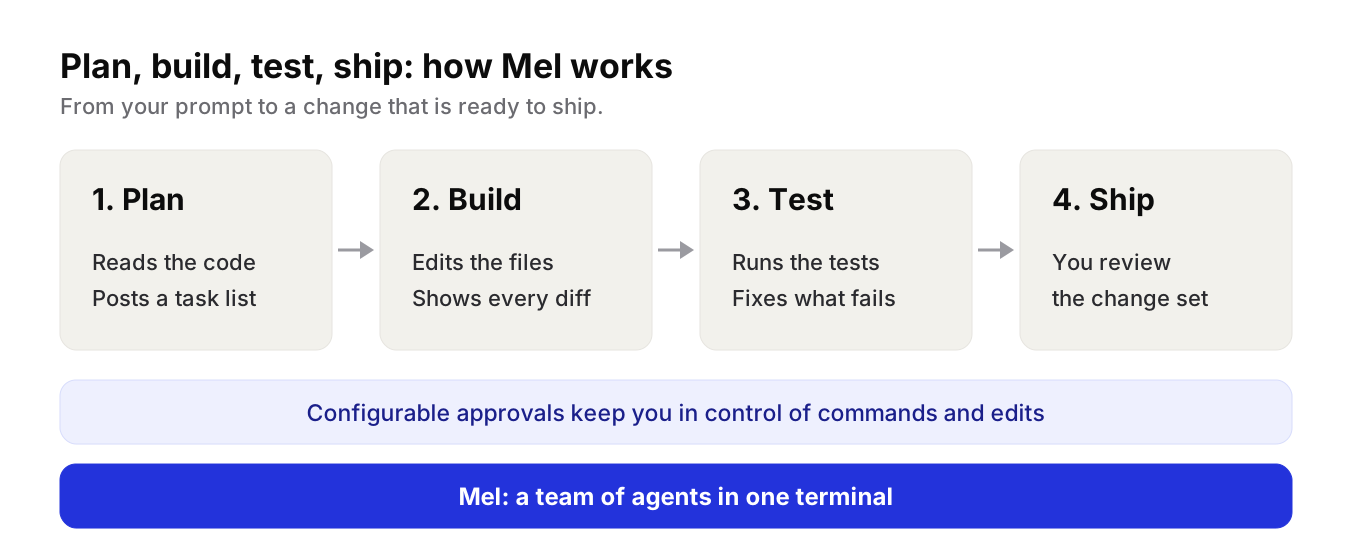
1. Plan
Mel reads before it writes. A typical run starts with the agent reading the relevant files and searching the project. Then it posts a Tasks card: a live checklist with one row per step. Each row shows whether it is pending, in progress or done, and the checklist updates as the work moves on.
For bigger changes there is plan mode. In plan mode the agent can read, search and browse, but nothing that would change a file or run a command is allowed until you approve a plan. The plan appears in its own panel. You approve it, or choose Keep planning so the agent can revise it.
2. Build
Next, the agent writes the code. It edits files and runs commands on your machine, in your project's folder. Every change it applies shows up as a diff card in the conversation, with the file, the lines added and removed, and the changed lines themselves.
Configurable approvals keep you in control of commands and edits. When an action needs your answer, an approval card shows exactly what the agent wants to do, with Allow, Always allow for that kind of action in this conversation, and Deny. If you deny, the agent is told and changes course. When you trust a run, autonomous mode lets it work hands-off, and every change is still recorded in the conversation.
3. Test
After a change, the agent checks its work. It re-reads the file or runs the build and the tests, rather than stopping at the first answer that looks right. If the build fails, it reads the error, fixes the code and runs it again.
4. Ship
When the checks pass, the agent finishes with a summary of what it did. You can open the whole change set in Mel's code review panel, or run git diff, and ship it the way your team already does.
Can an AI agent run the tests and fix the errors?
Yes, an AI agent like Mel can run your tests, read the errors, fix the code and run the tests again. Mel's agent runs real commands, such as your test runner or build tool, and reads the exit code and output. That output tells it what broke.
You get the best results when you say what "done" means. Put the checks in your prompt, for example "the build passes and the tests are green." The agent then keeps working until those checks hold, and you can watch each step land on the Tasks card.
Tip: start an agent run from a clean git state. Afterwards, git diff and the code review panel show you exactly what the run changed.
A team of agents for bigger jobs
Some work is too big for one agent. Mel can run a team: a lead agent splits the task, starts a team of agents, gives each one a scoped part of the job, and then checks the combined result. You choose in Settings > Agent mode whether the team starts on its own or waits for you to confirm it, and you can edit the team.
The agents can be Mel agents, or the Claude Code and Codex CLIs, so your team keeps the tools it likes. The lead does not take the agents' reports on faith. It checks the actual changes, the builds and the tests before it sums up.
| Step | What Mel does | Where you stay in control |
|---|---|---|
| Plan | Reads the code, posts a task list, or writes a plan in plan mode | Approve the plan, or keep planning |
| Build | Edits files and runs commands in your project | Configurable approvals for commands and edits |
| Test | Runs the build and tests, fixes errors, runs them again | Set the checks in your prompt |
| Ship | Sums up the work and shows the change set | Review the diff and ship it your way |
Models for each step
Mel works with Claude, GPT, Gemini, DeepSeek and Qwen. You can pick a model yourself, or leave it on Auto and let Mel choose for each turn.
Mel runs on Mac, Windows and Linux, and there is a VS Code extension. It is free with your own API key (your provider's usage charges apply). Pro is $20 a month and includes 1,500 hosted AI credits a month, and Max is $200 a month. Business gives a team shared credits and one invoice. See pricing.
Try Mel
Download Mel for free and give it a real task with real tests, or book a 15-minute demo to see a full run with your team.

Lalla is a hands-on tech founder, agentic infrastructure architect and the vision behind Mel.
Follow on LinkedIn